Data stored in Germany, AI processing in the EU
AI assistant for your company knowledge.
Hosted in Germany.
Thero connects company knowledge with AI that cites sources and respects existing access rights.
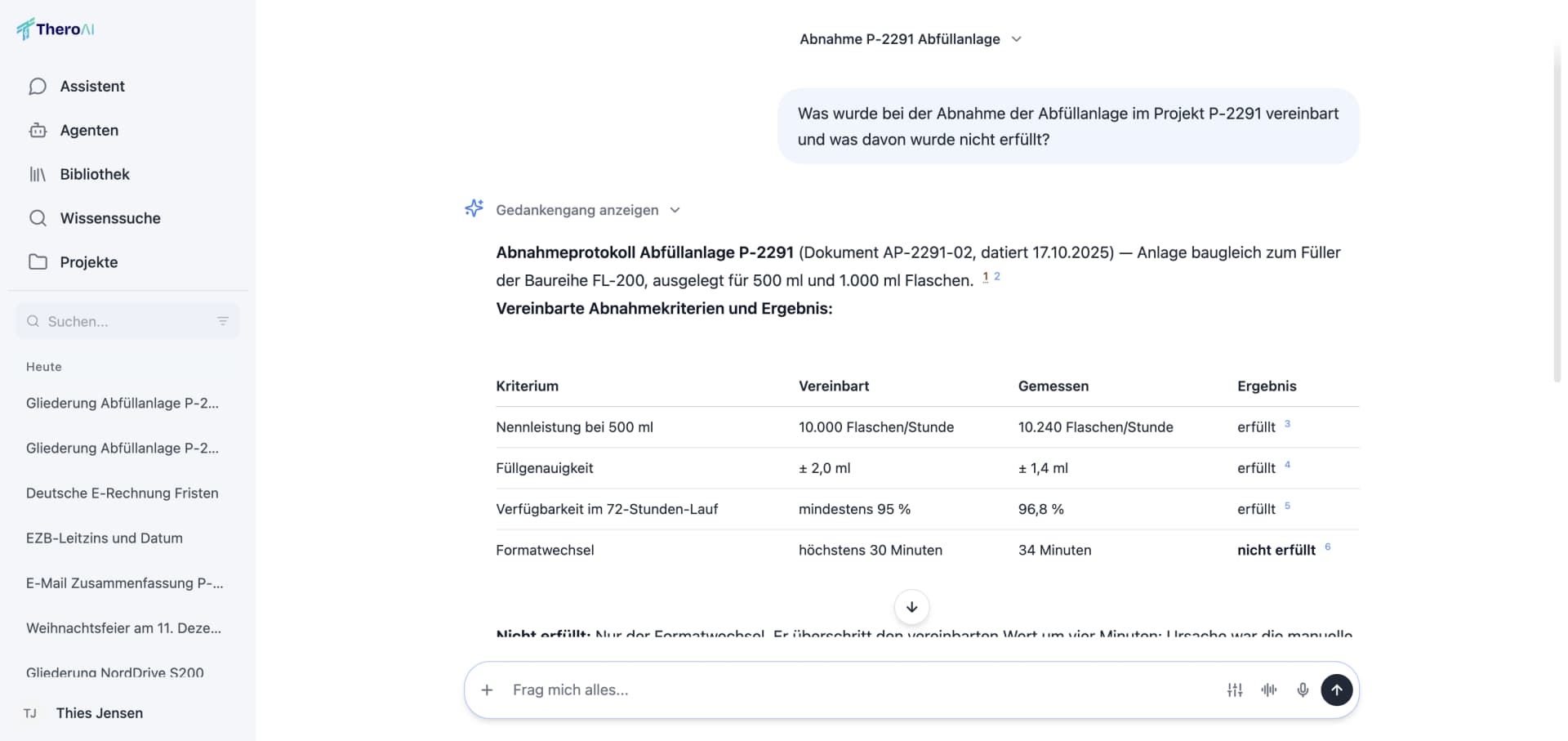
You ask the assistant your question.
Built with best-in-class technology



Answers from all your data
Connect your sources, ask questions and check the answers against the evidence.
Find & understand
Find information in your data. Search documents, emails and tickets.
Example: asked “By when do I need to take my remaining leave?”, Thero answers with two statements. Each statement carries a numbered source marker, and the matching source sits below it with the quoted passage.
Permissions reach all the way into the answer
Permissions are automatically mirrored so users only see what they're allowed to.
Example: the file Q3-Zahlen.xlsx lives in SharePoint and is shared with management only. Anna from management and Jonas, a working student, both ask about Q3 revenue. Anna gets the answer with a citation pointing at the file. Jonas gets the reply that there is no source on that.
Create & summarize
Create drafts from existing information. Write updates, memos and reports.
Automate
Connect work steps in a workflow. Define approvals for actions.
Example workflow with three steps: a form triggers the run, an agent drafts the reply, and sending the email waits for an approval. The email is only sent once it has been approved.
German data hosting
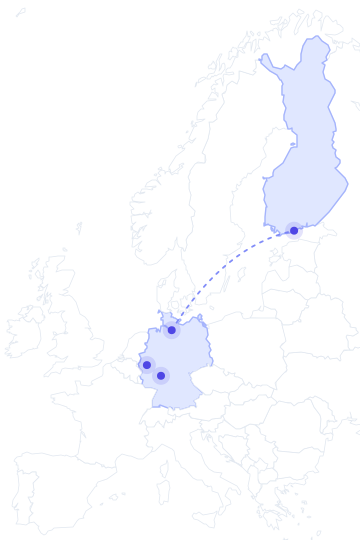
Your instance and data storage are in Germany. AI requests are processed by partners in Germany and Finland; the DPA defines the scope.
Privacy-First AI
Your data is never used to train public models. Audit logs included.
Every statement with its source in the original
A click on the source number opens the document beside the answer. The passage that backs it is highlighted.
The passage, not just the file name
The passage a statement rests on is highlighted in the document. You do not have to search for whether the figure is really there.
Jump from source to source
The arrows at the top of the document take you through all the sources of an answer. In this example there are eleven.
Only documents you may see
Answers rely only on content you already have access to. The source makes that traceable.
From the source to the record
Four steps, each with the screen from the running application that backs it.
Connect
Every system, one index
On sync, Thero reads content and access rules together and mirrors both into the same index.
- 29 connectors: Drive, Gmail, OneDrive, SharePoint, Outlook, Confluence, Jira, S3 and more
- User permissions are indexed with the content, not filtered afterwards
- Refreshed several times an hour, with real-time support
29 connectors, wired up inside the platform: Google Drive, Gmail, OneDrive, SharePoint, Outlook, Confluence, Jira, Dropbox, S3 and more. Ask
One surface for everything
The assistant comes with a prompt library and reaches every connected source.
- Ready-made prompts by department, extensible with your own
- Knowledge search, library and projects in the same navigation
- Answers that carry their sources, rather than free-form prose
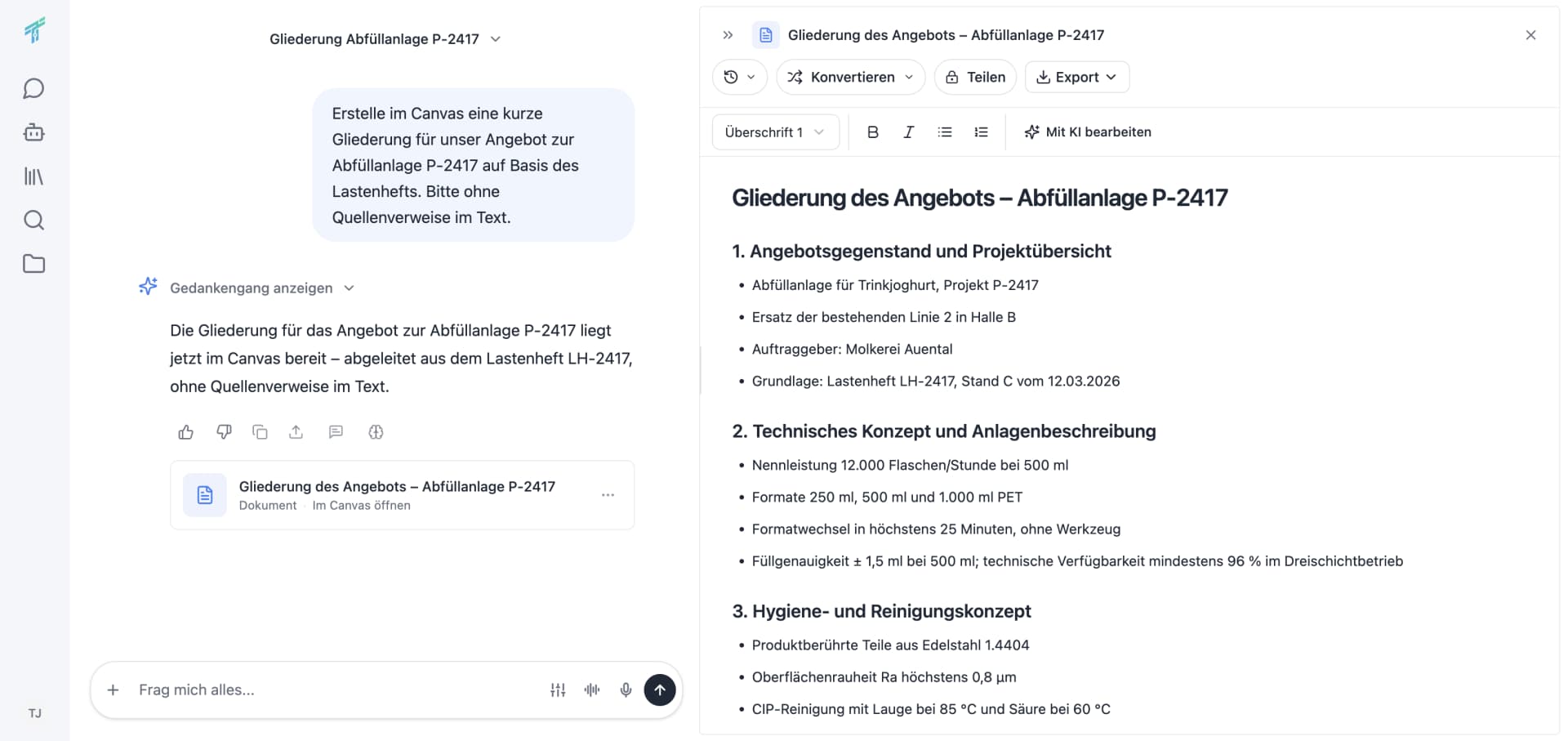
One click on the document in the chat and the canvas opens beside it. The outline is an editable document you can export. Act
Processes as steps
Triggers, agent steps and outputs live on a canvas. The inspector configures whichever step is selected.
- Public forms that let external people start a run
- Agent steps with their own instruction and variables
- Approvals where the run waits for a person
Building a process as a workflow: a form as the trigger, an agent step with its own instruction and an approval by a person, each set up in the inspector. Account for it
Every run on the record
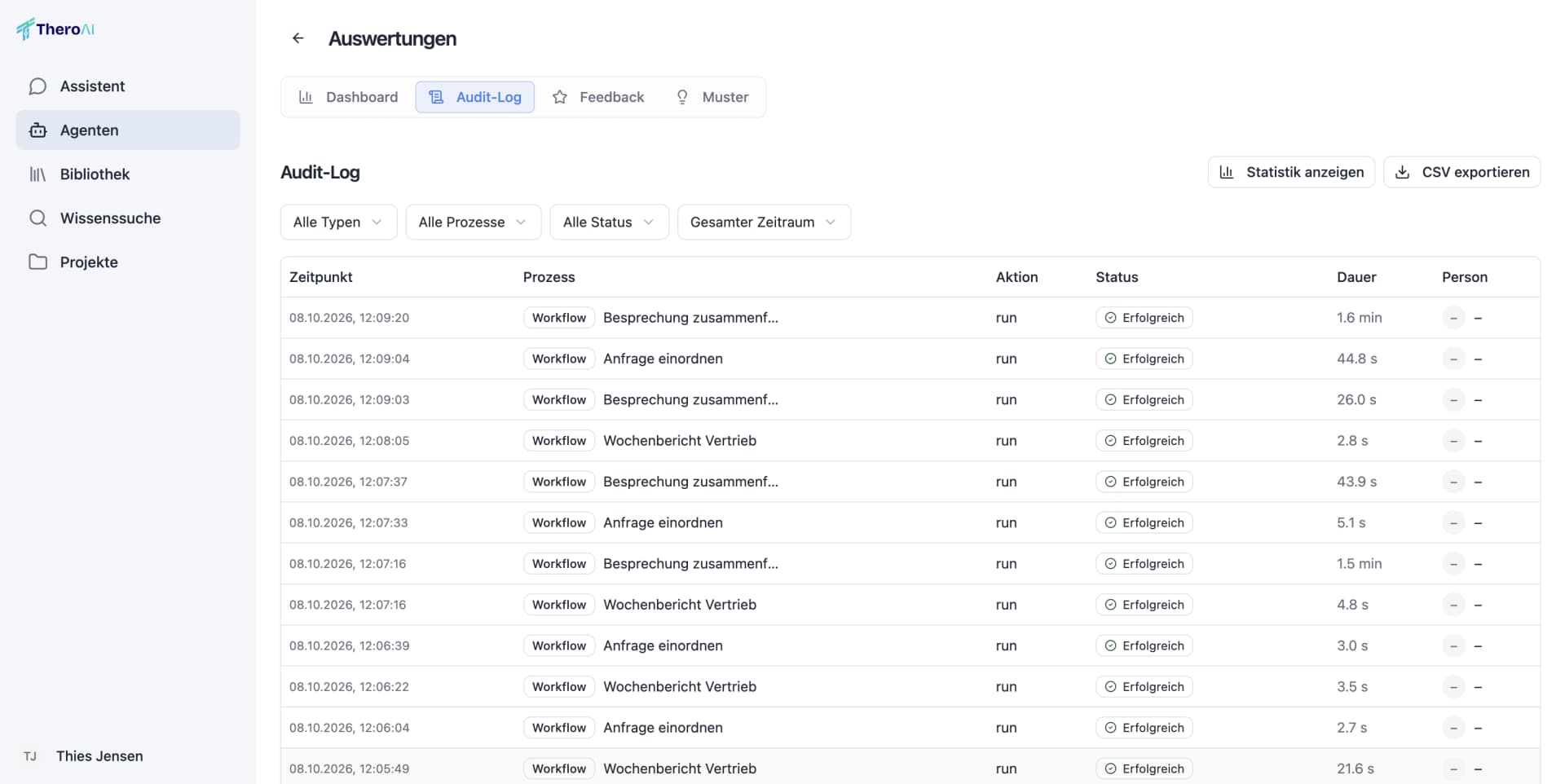
Timestamp, process, action, status, duration and the acting person, filterable and exportable as CSV.
- Filters by type, process, status and period
- CSV export for audit
- Seven authentication methods, including SAML and Entra ID
Connectors for your knowledge sources
A selection of our connectors. Each one inherits its source's permissions. What your team may not see never appears in an answer.

 Google Drive
 SharePoint Online
 Outlook
 Confluence
 Jira
Jira Gmail
Gmail OneDrive
 Amazon S3
 Dropbox
 Box
Box Azure Files
 GCS
GCS MinIO
MinIO Confluence Data Center
 Jira Data Center
 ServiceNow
 BookStack
 RSS
RSS Web
Web
Delta sync several times an hour instead of a nightly full dump, plus webhooks.
Built for every department
Search thousands of contracts in seconds. Identify risky clauses and summarize case files without leaving the secure environment.
Analyze tenders and market research instantly. HR can answer policy questions automatically based on handbooks in SharePoint.
Resolve support tickets faster by finding solutions from Jira and Confluence. Keep meeting minutes organized and searchable.
Shown: the sources menu. “Company knowledge only” limits answers to internal documents and data.
Packages by team size
Team size is a starting point. If a smaller team needs SSO or more connectors, we discuss the right configuration in your demo.
Prices in euro, contract under German law, hosted in Germany.
Recommended: Standard
1 to 80 users
Standard
Core Platform for small teams (e.g. medical practices, law firms)
Platform fee per instance, plus a per-user price
- Platform fee per instance: hosting, updates, security patches, basic support
- Basic Connectors: File Server, Microsoft 365
- Local User Management
- GDPR compliant, data in German data centers
- No use of data for AI training
81 to 350 users
For growing teamsProfessional
For mid-market (e.g. manufacturing, agencies)
Platform fee per instance, plus a per-user price
- All features from Standard
- Additional connectors: Jira, Confluence; further integrations subject to review
- SSO (OIDC/SAML) and AD Sync
- Roles & Permissions with Audit Logs
- Advanced Security and Compliance Options
351+ users
Enterprise
For enterprises & public sector (sovereign option available)
Custom Enterprise & Sovereign Setups
- All features from Professional
- Custom integrations (e.g. SAP, DATEV, Salesforce) subject to scope assessment
- Advanced RBAC Mapping and detailed Audit Logs
- Option for Fine-Tuning and dedicated environments
- Optional Private Cloud or Sovereign Deployments
An offer has three parts: one-off onboarding, ongoing operation of the instance, and a price per active user. What that adds up to depends on scope, connectors and deployment. That is why we work it through with you instead of publishing a flat number.
ROI calculator
Calculate your savings potential
Find out in just a few minutes how much time and money your team can save with TheroAI. Adjust all parameters to your specific circumstances.
Calculate savings nowYour numbers
derive the time saved from concrete activities
Open derivation
every formula visible with your values
Clear assumptions
a per-user model assumption instead of hidden factors
Questions before getting started
What does TheroAI do for our company?
Thero connects supported data sources to an AI assistant. Your team can find knowledge, summarise documents and create drafts. Recurring processes can be built as workflows with approvals.
How is Thero different from ChatGPT?
TheroAI is an independent platform by Syntriq GmbH. It focuses on connected company knowledge, source references, access rights and workflows. The right solution depends on your data sources, tasks and operating requirements.
Where is our data processed?
Instances and data storage are located in Frankfurt and Hamburg. AI processing uses partners in Germany and Finland. The security page describes the scope; contractual terms are set out in the DPA.
Is our data used for model training?
Contractual zero retention applies to our AI partners: no training on your data. Storage in your Thero instance and processing by the model provider are separate operations.
Which sources can we connect?
The catalogue includes SharePoint, OneDrive, Outlook, Google Drive, Gmail, Confluence and Jira. Availability, permissions and setup effort depend on your environment. Custom integrations require a separate scope agreement.
How are access rights handled?
Thero reads supported permissions during synchronisation and applies them in retrieval. Changes take effect after synchronisation. Testing different user roles is therefore part of implementation.
Can the AI give incorrect answers?
Yes. Citations and checks help you verify answers but do not guarantee accuracy. Check important claims against the original document; your team remains responsible for professional decisions.
How are costs calculated?
A quote includes one-off onboarding, ongoing instance operation and a per-active-user price. Scope, connectors and deployment are agreed before starting. Values in the ROI calculator are model assumptions, not published tariffs.
How does a pilot start?
In a 30-minute demo we discuss your tasks and show the platform. If appropriate, we then agree data sources, roles, effort and success criteria for a pilot. No confidential documents need to be uploaded for the first meeting.
Security is our product.
Don't compromise on compliance. TheroAI was built from the ground up for the strict requirements of German industry.
- GDPR compliant
- Hosted in Germany
- DPA on request